The Text Box supports the output of element attributes as well as tagged values associated an element.
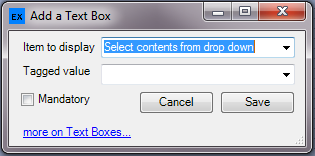
At run time values for the element attribute or tagged value are presented and can be modified, and assuming the form contains an Save button, the user can save these changes,
The design has the option to mandate that the user provides a response (for a text box the check is that the user has edited/entered text) by setting the "Mandatory checkbox". At run time the form will not save if the user does not meet the mandatory requirement.
To add a tagged value select "Specify a tagged value" in the drop down for "Item to display" and then either select from the list of existing tagged values in the "Tagged Value" dropdown or simply type a name. At run-time if the tagged value does not exist in the model it will be created for the edited element.
Field specific functionality
Name - If the designer adds a Textbox it will by default be multiline with the exception of the Name field.
Genfile - this field is used by EA for example to store the filename of a source file associated with a class. With eaForms we have provided the option to edit as well as support some actions that can help in your projects.
The following actions are provided
| • | Doubleclick on the field. If a valid filename is present this action will open the file using either a preconfigured application (see Configure programs settings) or if no filename is provided will present the user with the option to create a new file. |
| • | Rightclick on the field. If a valid filename is present then the user is presented with options to |
- open the file using a windows associated program
- open the file with a user pre configured application (see Configure programs settings)
- run the file