The purpose of this button is to provide a means open a new eaForm, opening the package defined in the button.
There are 2 variants of the next package buttons
| • | Next Package |
Ignores any changes to the current form and if default value is a valid GUID opens the relevant eaForm for the defined package
| • | SaveAndNextPackage |
Updates the current element from form and then if default value is a valid GUID opens the relevant eaForm for the defined package
These buttons were included to support sequencing through a defined set of packages - which exists within some organisations processes. So as an example the user may start with a specific package, which will be displayed with an eaForm that, and using tables within that eaForm make changes/additions to the contents; then when complete they will go to the next package and so on.
The button can be placed on any eaForm. The designer will select the target package at design time.
At run time pressing the button will launch the target item using a form matching the element type and stereotype of the target.
Keys points to note.
| • | The target package is preset by the designer |
| • | The target item is accessed through it's GUID |
Adding the Next Package button
1. Add button to eaForm selecting - Next package

2. Upon pressing the save button the designer is presented with a select package picker from which to select the target package
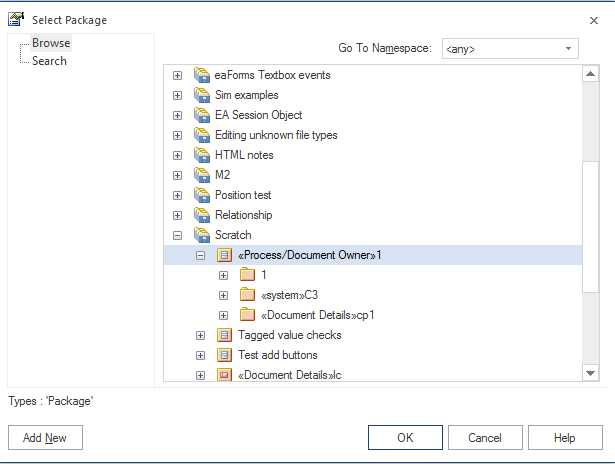
The press OK.
At this point the following information has been captured.
Button action = Next Package
Button name = set to the name of the selected target package
Button stores GUID of the target package
Editing the control
The designer can use the standard editor to access the Next Package button.
HOWEVER - as this has not been fully integrated changing button action will not work as expected.
The designer can modify:
1. The button name as desired
2. The target by double clicking on the Target GUID text box when you will be presented with the package picker.to change the selected target package - this will change the GUID value and set the button name to that of the target.

At run time
When the user presses the Next package button it will spawn the relevant eaForm.
If no eaForm exists, depending on the "Enable Generic Form" setting it will either present the generic form or present nothing.