There are a range of settings that can be configured by the user (or administrator) to define how eaForms will react.
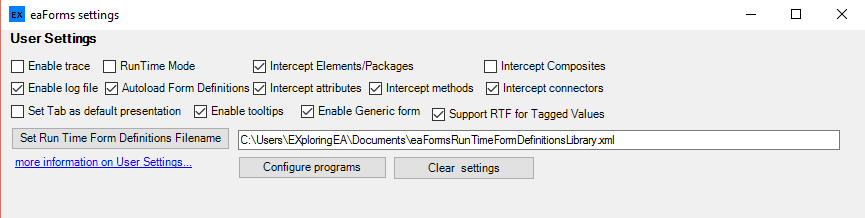
The meaning of each item (by row is)
Row 1
| • | Enable trace - can be enabled should the user experience problems and need to provide additional information to the support team - see Enable Logging for more information |
| • | Run Time Mode - when checked will disable the display of designer settings |
| • | Intercept Elements/Packages - when set eaForms will intercept EA element/package edit requests and if a suitable form is available present that to the user |
| • | Intercept Composites - when set eaForms will intercept items that are defined as composite when double clicked and so if the element has a child diagram this will be ignored and the eaForm opened. In most cases this should be left unchecked; use can be made of the context menu to access the relevant eaForms |
Row 2
| • | Enable log file - used to enable the output of all error messages to a log file - see Enable Logging for more information |
| • | Autoload Form Definitions - set will mean that on start up eaForms will attempt to load Form Definitions from the specified filename (below) |
| • | Intercept attributes - when set eaForms will intercept EA attributes edit requests and if a suitable form is available present that to the user |
| • | Intercept methods - when set eaForms will intercept EA methods edit requests and if a suitable form is available present that to the user |
| • | Intercept connectors - when set eaForms will intercept EA connectors edit requests and if a suitable form is available present that to the user |
Row 3
| • | Set Tab as default presentation - when checked present eaForm information in EA Tab rather than as pop-up form |
| • | Enable Tooltips - if set (default) will include any Tooltips that are defined for the form and controls in the run-time form |
| • | Enable Generic form - if set (default) will present a generic edit form if a designer provided form is not available |
| • | Support RTF for Tagged Values - enables formatted text to be stored in a tagged value |
Row 4
| • | Set Run Time Form Definitions Filename - presents the user with a file dialog from which to select the desired Form Definitions file; if desired the user can manually type the name into the filename text box |
Row 5
| • | Configure programs - is used to configure programs that will be used with element GenFile information |
| • | Clear settings - will reset all current user settings |