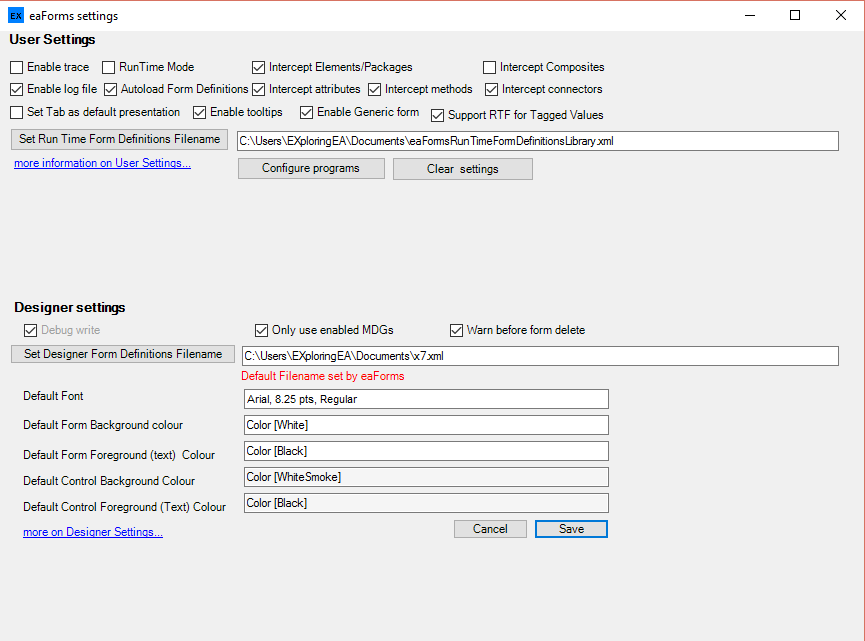
In design mode the settings box presents both the User (Runtime) and Designer options as illustrated below:
User settings
Designer settings
| • | Only use enabled MDG's - to support MDG's eaForms can load all MDG files that are present on the designers system - check the box to limit to the subset of MDG's that have been enabled in the current model |
| • | Warn before form delete - enables a warning before deleting a form definition |
| • | Set Designer Form Definition Filename - is the file in which the Form Definition Library is stored |
| • | Default font - specified the font that will applied on the creation of new controls (it will no affect the font of controls that already exist on the form); double click the entry box to bring up the font dialog. The text in the entry box will reflect that of the selected font |
| • | Default colours - the designer can set the default colours to be applied for both form and controls. double click the relevant entry box to bring up the colour dialog. The colour of the entry boxes will reflect the selected background/foreground colours. |