An eaForm ComboBox is a control whose value can be selected from a list of items specified at design time.
Below is an extract of a screenshot illustrating a ComboBox.
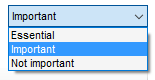
This list of values may be select from
| • | Standard EA reference data |
| • | MDG enumerations |
| • | a list typed by the designer |
In addition, to providing the list of items the designer can select one of the items as the default value.
At run time if the value is changed then the current form element/connector is updated and the contents refreshed.
ComboBox specific attributes
| • | Item to be displayed - either an element field or specify a tagged value |
| • | Tagged value (if applicable) - tagged value name of item is to be a tagged value |
| • | Combo list selection - drop down of available reference data sources which may or may not be used to define the Combo List values |
| • | Combo list values - a CSV list of values that will be present in the target drop down list - not that to accommodate values that contain "," then the designer can specify the tokens with square [] brackets e..g. [<100],[200],[10,000],[>10,000] - the brackets are not displayed - if brackets are used they MUST be used for all items in the list |
| • | Default value - a value selected from the Combo List Values if required |
| • | Autosize - relates to controls that will adjust their size to the contents - e.g. labels, buttons |
| • | Response is mandatory - used to mandate that the selected value must be set - the current rule is to check for a valid value that is not a null string |
| • | Sort - used to indicate if the list when presented should be displayed in the order defined in the Combo list values or sorted in alphabetical order. |
| • | Save on change - used to save the value immediately (not undoable by cancel on form) AND will form a refresh of the form to update any other fields that share the same data source |
Standard control attributes
| • | Enabled - means that the control will be presented at run-time - the default is that the control will be presented. |
| • | Tab order - is the sequence number that is used by windows to move through the controls at run time |
| • | Anchor - this sets the reference point of the form against which the control is fixed and affects the movement of the control if the run time form is resized. Valid values consist of a combination of these letters to indicate where the control is locked |
- T (top)
- B (bottom)
- L (left)
- R (right)