The eaForms related element control is a control which can be used to create or delete links between the current element and others which have a defined element type and stereotype, with a defined connection type and stereotype.
In defining the Related Element the designer specifies 4 values:
| • | The Target Element Type |
| • | The Target Element Stereotype (if required) |
| • | The Connector type to be used to connect between the edited element and the target element |
| • | The stereotype to be applied to the connector (if required) |
At runtime the user is presented with a control in which they can select a target package (see below note on target package) using the button [...] - the control will then list any elements that match the defined (pre-set selection) criteria and the user can select 1 or more items with which to connect.

And then when editing an element the user is presented with a list of matching target elements.
The user can then check / uncheck the element entries to create/maintain or delete a link of the relevant type between the current element and its target(s).
Note - the Related Element control does not modify any elements and/or connectors where there is not a match on the type and stereotype of each respectively
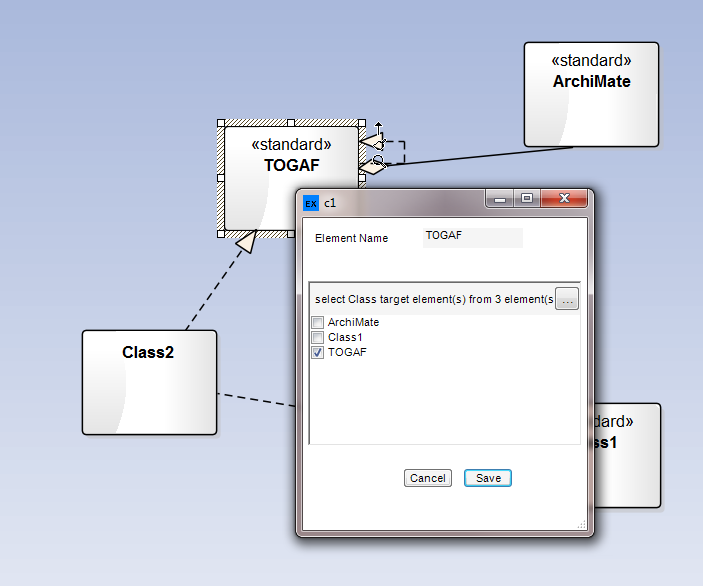
If the control has been configured as mandatory then at least 1 item must be selected before the form can be saved.
The selected target package is stored in each users settings for subsequent use.
The designer can set a rich text box:
| • | Mandatory - to ensure that a value is entered |
| • | Tab order - used to set the sequence that controls will be select should the user tab through the form |
| • | Anchor - use to specify |
Control specific attributes
| • | Enabled - means that the control will be presented at run-time - the default is that the control will be presented. |
| • | Response is mandatory - used to mandate that the selected value must be set - the current rule is to check for a valid value that is not a null string |
| • | Tab order - is the sequence number that is used by windows to move through the controls at run time |
| • | Anchor - this sets the reference point of the form against which the control is fixed and affects the movement of the control if the run time form is resized. Valid values consist of a combination of these letters to indicate where the control is locked |
- T (top)
- B (bottom)
- L (left)
- R (right)
Note on target package
When using the Related Element, the target package selected by the user is persisted by storing their choices in the application settings on their current machine; these are specific to a user/machine configuration and are NOT stored in the model. Each choice is linked to an individual related element control for a specific form and is not shared.