Scripts can be dangerous so CHECK the operation of your script thoroughly before deploying and see eaForms Script restrictions
eaForms Script buttons offer:
| • | Save the element and run script - will save any updates made on the form and then execute the script that is included in the button definition (see below) |
| • | Run script and conditionally save - will execute the script included in the button definition and depending on the result save any updates to the element and close the form or return to the current eaForm; the user can cancel if they wish. |
Overview of script buttons
We have provided script buttons. The idea is that the execution of a script which could perform some actions at the point that a user wishes to save their work could be used on a variety of ways. For example, to validate information, update a file with details of elements that have been changed, prevent the saving of information to already approved items... the list could be is endless and will vary depending on project needs.
To avoid issues that could arise if the script were not installed in the model or on the users system we embed the script definition in the form definition at the design stage.
When the designer selects the Add Control | Button and then selects a script data source they are presented with a form in which to write the script when they save the button definition. The designer will put the script text into this dialogue and save.
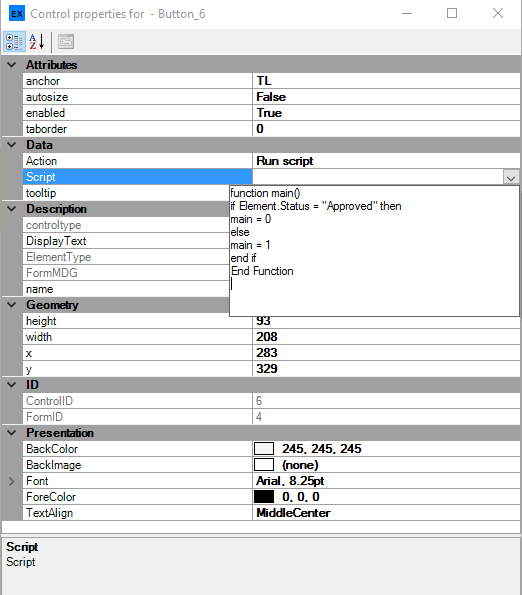
As with all controls they changes to the control script can be made through the relevant control properties as illustrated below.
Operation
Rules
| • | eaForms will call the function / subroutine called "main" - so ensure that this is the top level item in your script |
| • | eaForms will pass the following objects: |
- Repository
- Element
| • | If using the conditional action button eaForms expects the function main to return the number |
- 1 if the script is true and the save operation will execute and close the eaForm
- 0 if the script is false and the save operation will NOT be performed